
The real question isn't whether to convert.
It's when, and how much.
Roth conversion software for CPAs, CFPs, and financial advisors. It quickly models the whole household, scores every strategy, and shows every step of the math.
The tools you have get in your way.

Enterprise planning software
- Expensive
- Bloated
- Slow to learn
- Output only an actuary could love

Spreadsheets
- Error-prone
- Eat precious time
- Break the moment a rule changes
- Can't be handed to a client
Built for professionals, designed for simplicity.
Simple, friendly, quick
A guided wizard in plain language walks you through the plan. No manual, no training course, no onboarding call. If you can describe the household, you can model it.
The whole household picture
Accounts, income, Social Security, real estate, and taxes projected together, year by year. That full picture is the only way to get the conversion question right.
Math that survives scrutiny
Every state's tax tables, IRMAA with the real two-year lookback, RMDs straight from the IRS Uniform Lifetime Table, rental depreciation and passive loss phase-outs. Depth most Roth calculators don't attempt.
Minutes, not afternoons
No enterprise onboarding to sit through, no spreadsheet formulas to wrangle. A full household plan comes together in minutes, with six strategies scored automatically.
Output that wins the client
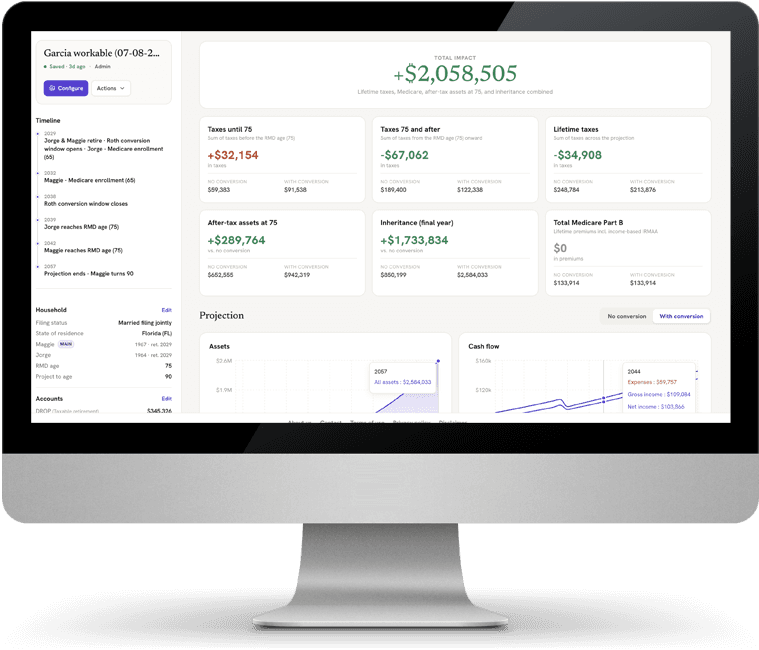
A clean side-by-side on the four numbers clients care about: overall impact, lifetime taxes, after-tax assets, and inheritance. Charts for the story, a year-by-year table for the detail.
Share, save, collaborate
Save named plans, invite clients as viewers and colleagues as editors, and let revision history track every change. The plan lives online, so it never goes stale.
The four numbers clients actually ask about.
Overall impact, lifetime taxes, after-tax assets, and inheritance.
Every plan compares doing nothing against converting, side by side, with interactive charts that show the story at a glance and a year-by-year table that shows the work behind every number.
When the client asks "where does that number come from?", you can answer, line by line.
The details that decide the answer.
Six strategies, scored
Spread evenly, convert immediately, fill the bracket, stay under IRMAA, empty by RMD, and more, each scored against doing nothing so the winner is obvious.
All 50 states, plus DC
Brackets, deductions, and how each state treats Social Security and capital gains.
IRMAA done right
MAGI tiers with the real two-year lookback, so a conversion today doesn't surprise your client in two years.
RMDs by the book
SECURE 2.0 start ages and the IRS Uniform Lifetime Table, not a flat percentage.
Real estate included
Rent, mortgage amortization, appreciation, straight-line depreciation, and passive loss rules with the $25k allowance phase-out.
Every step shown
A year-by-year table of every number, so you can defend the recommendation line by line.
The full checklist.
Conversion strategies
- Even conversions over a chosen window
- Convert immediately
- Fill the 12%, 22%, or 24% bracket
- Stay under the IRMAA cliff
- Empty tax-deferred accounts by RMD age
- Manual year-by-year schedule
- Every strategy scored against doing nothing
Tax engine
- Federal brackets and standard deduction
- Senior bonus deduction with phase-out
- All 50 states plus DC
- Long-term capital gains, stacked correctly
- Social Security income and taxation
- Medicare Part B with the IRMAA two-year lookback
- RMDs by SECURE 2.0 ages and the IRS Uniform Lifetime Table
- Single, married filing jointly, and head of household
Accounts and income
- 401(k), 403(b), 457(b), IRA, TSP, and DROP
- Roth, brokerage, savings, CD, and annuity accounts
- Joint after-tax accounts
- Contributions and deposits, pre-tax or after-tax
- Pensions, wages, and scheduled withdrawals
- Household expenses over time
Real estate
- Rental income and operating expenses
- Mortgage amortization and appreciation
- Straight-line depreciation
- Passive loss rules with the $25k allowance
- MAGI phase-out and loss carryforwards
- Real estate professional treatment
Output
- Baseline and conversion, side by side
- Lifetime taxes, Medicare, after-tax assets, inheritance
- Interactive assets and cash-flow charts
- After-tax assets timeline, year over year
- Year-by-year table with every number, expandable
- See-through math: every step shown
Save and share
- Save and name unlimited plans
- Invite clients and colleagues by email
- Viewer, editor, and admin roles
- Live share links that never go stale
- Revision history with preview and restore
- Duplicate plans, import and export
From household to conversion schedule, in three steps.
Describe the household
A guided wizard walks through people, accounts, income, Social Security, and real estate. A full plan takes minutes.
Compare strategies
Six conversion strategies are projected year by year and scored against doing nothing, so you see exactly when and how much to convert.
Share the plan
Send clients a live view and invite colleagues as editors.
Ready to answer when, and how much?
Build a full household plan in minutes and see the conversion schedule for yourself.